
One of the most common questions we get is about pixel pitch and how to choose the right one.
At first glance the answer seems simple: smaller must be better, right? A smaller pixel pitch means more LEDs packed into the display, which typically means higher resolution and smoother images.
But in real-world installations, choosing the right pixel pitch involves more than simply selecting the smallest number available. Factors like viewing distance, brightness, processing requirements, and overall system value all play a role in selecting the best display for a space.
What Is Pixel Pitch?
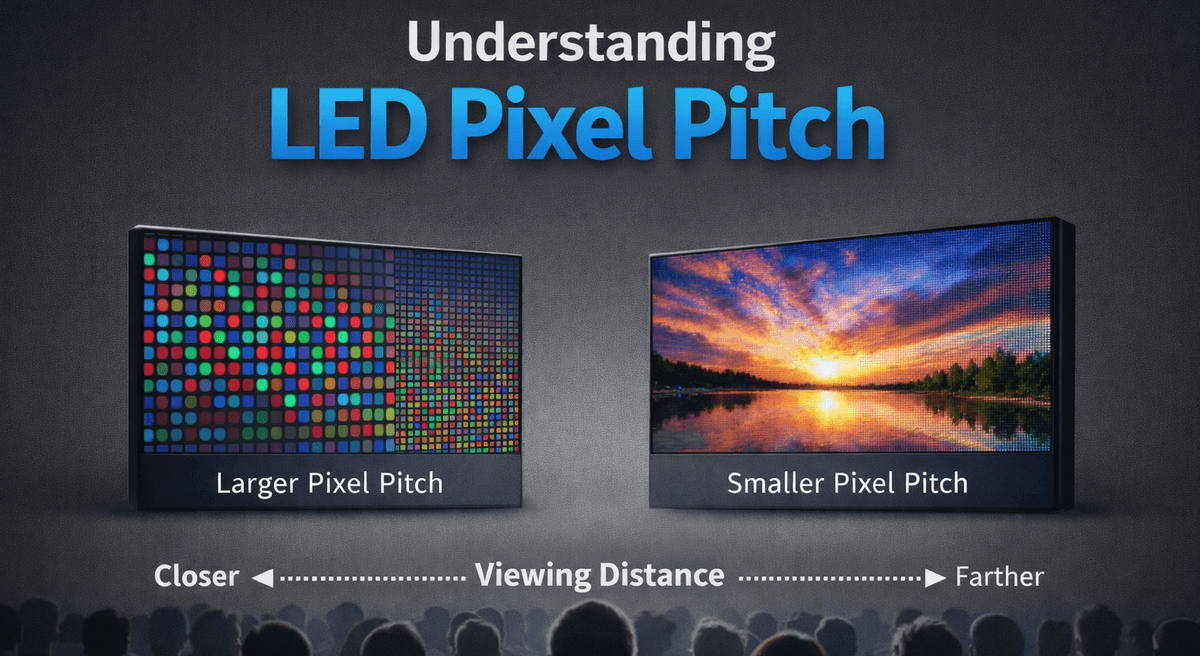
Pixel pitch refers to the distance between the center of one LED pixel and the center of the next, measured in millimeters.
For example:
- P2.5 means the pixels are spaced 2.5 millimeters apart
- P1.8 means 1.8 millimeters between pixels
- P3.9 means the pixels are spaced 3.9 millimeters apart
The smaller the pixel pitch number, the more densely packed the pixels are on the screen. Higher pixel density generally produces a smoother image, especially when viewers are closer to the display.
The “Smaller Is Better” Myth
Many people assume the smallest pixel pitch available must automatically be the best option. While ultra‑fine pitches can look incredible, they also introduce tradeoffs that are often overlooked during the planning stage.
Processing Requirements Increase
When pixel pitch decreases, the number of pixels across the screen increases dramatically. More pixels means more data that must be processed, transmitted, and rendered in real time.
A large LED wall built with P1.5 panels can contain millions more pixels than the same wall built with P2.5 panels. That increase in pixel count means:
- More sending card capacity
- More receiving cards
- More processing channels
- Greater bandwidth requirements
In some projects, the video processing infrastructure becomes the limiting factor long before the display itself.
Brightness Considerations
Pixel pitch can also influence brightness.
When LEDs are packed very tightly together, the physical LED packages are often smaller. Smaller emitters can produce less overall light output compared to displays with slightly larger pitches.
This becomes especially important in spaces like:
- Church stages
- Sanctuaries with theatrical lighting
- Corporate event venues
- Rooms with natural daylight
In these environments brightness and contrast can be just as important as resolution.
Cost vs Real‑World Benefit
Ultra‑ine pixel pitches can increase system cost significantly. However, the visual difference may be minimal if viewers are seated farther from the screen.
For example, if most viewers are 30–40 feet away, the difference between a 1.5mm display and a 2.5mm display may be extremely difficult to notice. In that situation, the larger pitch may actually provide better value while still delivering an excellent viewing experience.
Viewing Distance: The Most Important Factor
One of the most important variables when choosing pixel pitch is how close viewers will be to the screen.
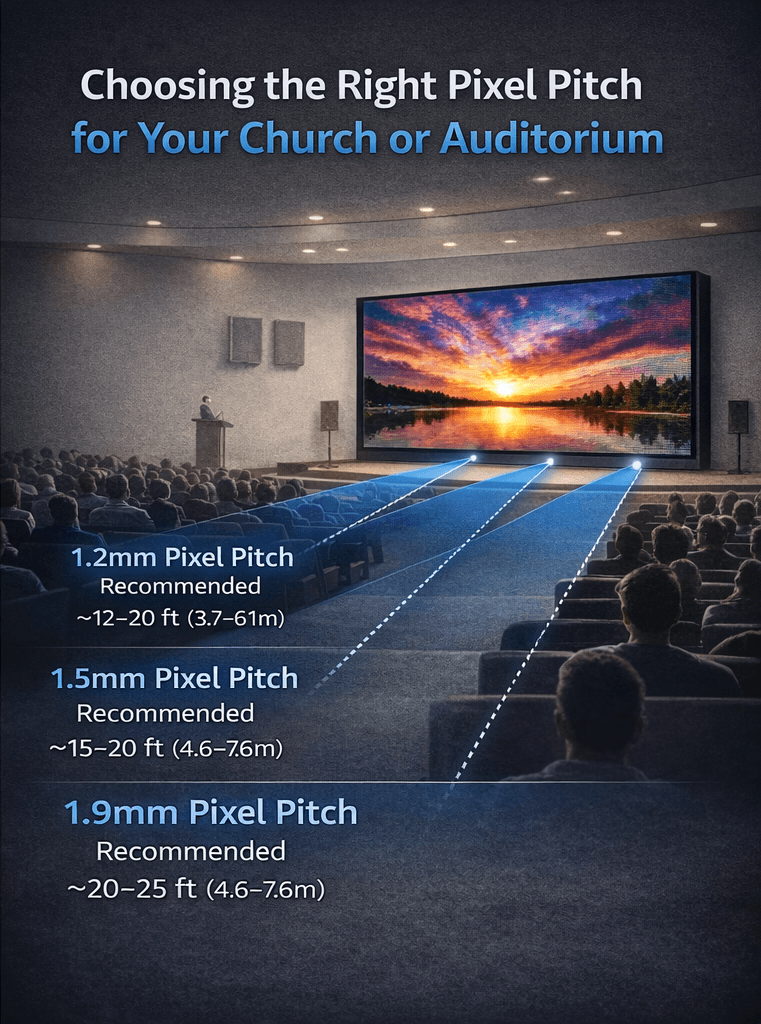
Pixel pitch determines how densely the LEDs are arranged on the display. That density directly affects how close a viewer can stand before individual pixels become visible. Smaller pitches allow viewers to sit closer while still seeing a smooth image, while larger pitches require greater viewing distance.
Visual Acuity Distance
Engineers often estimate viewing distance using a concept called visual acuity distance. This is the distance at which a person with normal 20/20 vision can no longer distinguish the individual pixels that make up the display.
Once viewers move beyond this distance, the pixels visually blend together and the display appears continuous and smooth.
The 10x Rule
Because the visual acuity calculation can be complex, many designers use a quick rule of thumb known as the 10x rule.
This shortcut estimates viewing distance by multiplying the pixel pitch by ten.
For example:
- 1.8mm pitch ≈ about 18 feet
- 2.5mm pitch ≈ about 25 feet
- 3.9mm pitch ≈ about 39 feet
While this rule is only an approximation, it provides a quick starting point when estimating appropriate viewing distance.
Comfortable Viewing Distance
In real-world installations, acceptable viewing distance is influenced by more than mathematics. Factors like eyesight, content type, display brightness, and environmental lighting all affect how the image is perceived.
Because of this, integrators often consider what’s called the average comfortable viewing distance — a practical estimate based on real installations where viewers generally find the image quality acceptable.
Typical Comfortable Viewing Distances
- 1.5mm – about 8–9 ft
- 1.8mm – about 10 ft
- 2.5mm – about 14 ft
- 3.0mm – about 17 ft
- 4.0mm – about 22 ft
Finding the Right Balance
Choosing the right LED wall ultimately means balancing several factors:
- Pixel pitch and resolution
- Brightness requirements
- Video processing capabilities
- Viewing distance
- Budget and long‑term value
The goal is not simply selecting the smallest pitch available. The goal is choosing the display that best fits the room and delivers the best experience for the audience.
The Right Display for the Room
At Impress LED, we often encourage customers to start with a simple question:
“What will the audience actually experience?”
When pixel pitch, brightness, processing, and viewing distance are properly balanced, the result is a display that looks incredible, integrates smoothly into the system, and performs reliably for years to come.
And when everything is dialed in correctly, the result is exactly what every great LED wall should do: illuminate the room, inspire the audience, and leave a lasting impression.